e-label information
Introduction
Electronic labeling, or e-labels, for wine and spirits is governed by EU Regulation 2019/787, which is also known as the "Wine Act". This regulation sets the rules for the production, presentation, and labeling of wine, including the use of e-labels. In addition, the EU Regulation 1169/2011 (Food Information to Consumers Regulation or FIC Regulation) also sets the requirements for labeling.
e-labels appear on product packaging or on digital marketing materials and must contain all of the legally required information about a product, including, the product name or brand, volume, alcohol content, ingredients, and allergen information. The e-label format must comply with the EU regulations for food and beverage labeling, including the requirements for font size, language, and legibility.
Scantrust also offers a non-regulated food and beverage template that uses the same JSON structure.
There are 3 ways e-labels can be managed in Scantrust
- Edit e-label data in the scantrust portal under the products > e-label page
- Using the Scantrust excel file bulk upload feature available in our enterprise plans
- Upload the e-label data for each product with the Scantrust e-label JSON API
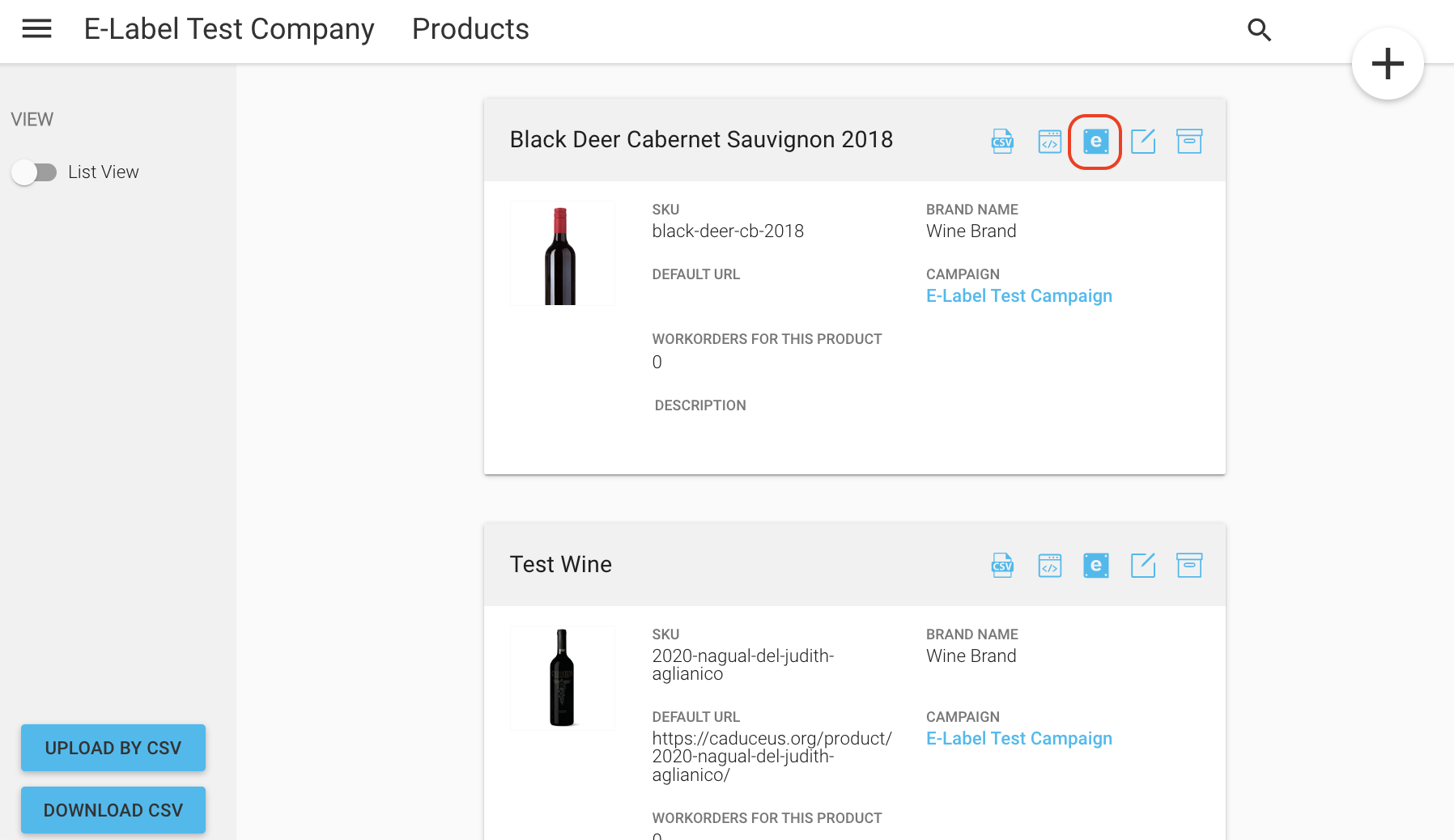
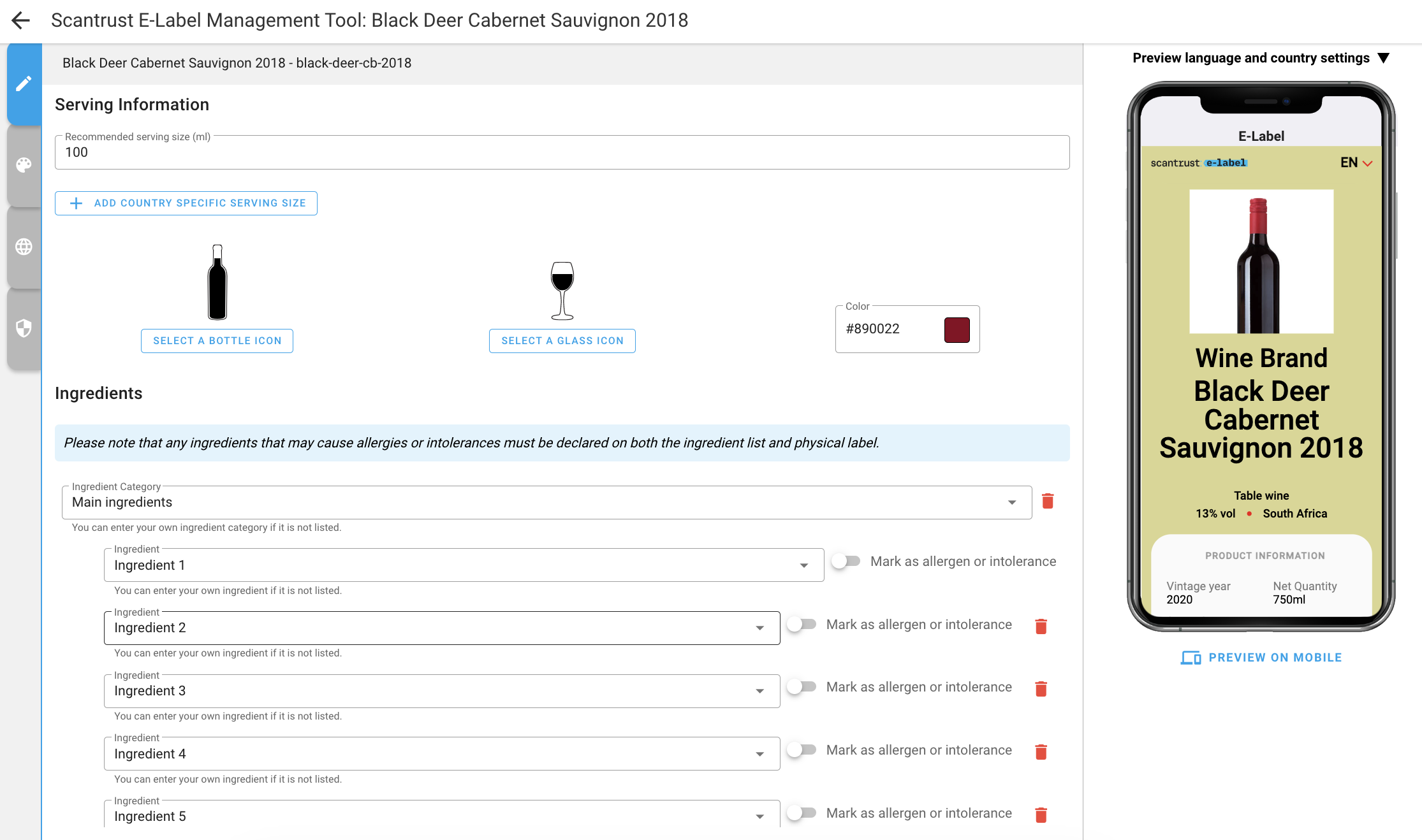
The below process describes how to upload and download e-label data using the Scantrust REST Api. Because e-label data is set on the product, you will need a UAT token with the same minimum permissions as for managing products:
product_createproduct_deleteproduct_editproduct_view
The UAT token must be set in the header fields of all requests as described in Authentication & Tokens.
API Design
POST: /api/v2/products/{product_id}/elabel/
Sets all e-label JSON data for a product. The first call creates the e-label of the product, later calls update it.
Response (200): Status OK
{
  "name": "demoproduct", // product sku
  "is_published": false,
  "data": {
    "editor": { ... },
    "published": { ... }
  }
}
Note that a complete JSON object needs to be posted each time an e-label is updated. This endpoint does not support partial updates of the JSON.
For an example of a full set of data to POST for the editor section, see JSON example here
Once the data object is ready to be published, set published to an identical copy of editor (the landing page only shows published) and do another POST request with the updated data and the is_published flag set to true.
A product can hold either an e-label or a Digital Product Passport (DPP), never both.
GET: /api/v2/products/{product_id}/elabel/
Returns all e-label JSON data for a product
Returns 404 {"detail": "Elabel not found"} if the product has no e-label yet.
Response (200): Status OK
Example JSON:
{
  "id": 1272,
  "company": 7583,
  "name": "black-deer-cb-2018",
  "data": {
    "editor": {
      "type": "wine",
      "theme": { "primary": "#F01515", "background": "#D8D790", "alcoholColor": "#890022" },
      "footer": { "first_line": "", "second_line": "" },
      "header": { "logo": "", "title": "E-Label" },
      "default_country": "",
      "default_language": "en",
      "reviewed_languages": ["en"],
      "available_languages": ["en"],
      "enforce_language_per_country": false,
      "sections": [
        { "key": "product-infos" },
        { "key": "geographical-indications" },
        { "key": "serving-infos" },
        { "key": "ingredients" },
        { "key": "allergens" },
        { "key": "nutrition" },
        { "key": "responsible-consumption" },
        { "key": "sustainability" },
        { "key": "business-operator" },
        { "key": "brand-infos" }
      ],
      ... (JSON objects for each of the above sections)
    "published": {
      ...
    }
An e-label JSON contains 2 set of the e-label data at all time.
editor: draft version of the data, the data that you see in when using the e-label management tool.published: Live data. What consumer see when they open an e-label landing page.
The elabel JSON consists of a set of generic fields and 11 sections each with its own JSON object:
Generic Fields
type: wine, spirit, aromatised_wine or food_and_beverageversion: template schema version, always1theme: sets theprimary,backgroundandalcoholColorof the landing pagefooter: sets the text for thefirst_lineandsecond_lineof the e-label footer and theprivacylink (URL) and itsprivacy_descriptiontranslations fieldheader: sets thelogoandtitle(default: "E-Label")default_country: sets the data for the country to be shown when an e-label is scanned in a non-EU country. This is a 2 letter uppercase country code, eg: 'FR' for Francedefault_language: sets the default language (default: English), this is a 2 letter lowercase language code, eg: 'en' for Englishreviewed_languages: array of reviewed languages available to users on the landing page.available_languages: array of available languages that may not have been reviewed yet. The review process happens in the translation section of the e-label editor. Once a language gets 'approved' it will be added to thereviewed_languagesarray.enforce_language_per_country: forces a fixed language for each country (default: false)sections: array of{ "key": "<section>" }objects in display order. Add"is_hidden": trueto an entry to hide that section without deleting its data.
Section Objects
- Product Information
product-infos - Ingredients
ingredients - Serving Information
serving-infos - Nutrition Table
nutrition - Responsible Consumption Message
responsible-consumption - Sustainability Certifications
sustainability - Geographic Indications
geographical-indications - Business Operators
business-operator - Additional Information
brand-infos - Free Sections
free-sections(food and beverage template only) - Impressum
impressum
Each section contains variable information inluding country specific data and translations fields as well as pre-translated system keys
These fields will be formatted as follow:
  /* country specific field */
  "serving": {
    "default": 100, // default value
    "FR": 76 // country specific value
    ...
  }

  /* translations field */
  "product_name": {
    "en": "Demo Product Name",
    "de": "Name des Demoprodukts",
    "fr": "Nom du produit de démonstration"
    ...
  }

  /* system key field */
  "type": "wine_type_wine"

  /* non-translated field */
  "vine_variety": "Merlot"
Fallback behaviour:
- for country specific fields, if a the country does not have a specific value, it will fallback to the
defaultvalue. - for translations fields, if there is no entry for the selected language on the landing page, it will fallback to the
default_languagevalue
System keys
System keys are a set of pre-translated value used throughout the e-label. All the values that you can usually see from our various dropdown in the editor are based on system keys. When possible, you should use these keys since it would greatly reduce the workload required to create an e-label JSON since all the translations would automatically work for these terms.
For a full list of system keys please refer to this page
In most cases, a system key field can also be used like a translations field by simply replacing the content from a key to an object containing the translations.
product-infos
System key fields:
typewine_sweetness: Wine and aromatised wine onlywine_colourproduction_methodbottled_in_protected_atmosphere: Only needed if product uses packaging gasesorigin_prefix: text shown before the origin, e.g.produced_inalcohol_content,sparkling_content: Aromatised wine only
Translation fields:
product_namesales_descriptiontraditional_termsproduction_method: use system key if possibletype: use system key if possible; food and beverage always uses a translations fieldageing_methods: spirit only
Non-translated fields:
vine_variety
Other fields
origin: 2 letter uppercase country code arrayvolumes: Bottle volumes in ML (string array). Wine, spirit and aromatised wine onlyalcohol_volume: alcohol volume as a stringvolume_quantity,volume_unit: Net quantity and its unit (ML,CL,L,GorKG). Food and beverage onlycustom_fields: Array of extra fields. Food and beverage onlylabel: field name, translations fieldvalue: field value, translations field
vintage_year: Wine onlyproducing_year: Age in years. Spirit onlyshow_sku: Display the product SKU (boolean)hide_brand_name: Hide the brand name (boolean)gs1_fields: GS1 Digital Link codes only. Application identifiers to display:"01"GTIN,"10"lot,"21"serial number,"22"consumer product variant
  "product-infos": {
    "type": "wine_type_wine",
    "origin": [
      "FR"
    ],
    "origin_prefix": "produced_in",
    "volumes": [
      "750"
    ],
    "product_name": {
      "en": "Demo Product Name",
      "de": "Name des Demoprodukts",
      "nl": "",
      "fr": "Nom du produit de démonstration"
    },
    "alcohol_volume": "13",
    "sales_description": {
      "en": "A product description",
      "de": "Eine Produktbeschreibung",
      "fr": "Une description du produit"
    },
    "traditional_terms": {},
    "bottled_in_protected_atmosphere": "bottled_in_protected_atmosphere_1",
    "vintage_year": "2018",
    "wine_sweetness": "wine_sweetness_B_dry",
    "vine_variety": "Merlot",
    "wine_colour": "wine_colour_red",
    "production_method": "production_methods_barrel_aged",
    "show_sku": false,
    "hide_brand_name": false,
    "gs1_fields": ["01"]
  }
Example of the fields specific to the food and beverage template:
  "product-infos": {
    "type": {
      "en": "Flavoured sparkling water"
    },
    "volume_quantity": 500,
    "volume_unit": "ML",
    "custom_fields": [
      {
        "label": {
          "en": "Best before"
        },
        "value": {
          "en": "See cap"
        }
      }
    ]
  }
ingredients
There are 2 ways of declaring your ingredient list:
- Using the scantrust system keys: set
use_free_formtofalse. This is the recommended approach - Free text field: set
use_free_formtotrue
If you chose to use the free text field option, you will need to fully format and translate your ingredient list according to the regulations. If you use the system keys, all the formatting and translations will be handled automatically by the e-label landing page.
Food and beverage e-labels only support the free text option: set use_free_form to true and provide the ingredient list in free_text.
Other fields
allergens_icons: Array of system keys icons for allergensaromatised_wine_type,aromatised_wine_list: Base grapevine product (system key) and its ingredient list, same format aslist. Aromatised wine onlycustom_icons: Custom allergen pictograms, same format as inresponsible-consumption. Food and beverage only
Declare using system keys
Each ingredient is an individual object in the list array and uses the following attributes:
category: system-key fielddescription: system-key field, can also contain translationsis_organic: boolean, defines if an ingredient should appear as organicis_allergen: boolean, defines if an ingredient should appear as allergenis_contained_display: boolean, this defines how a category should be formatted. This will only affect a few specific categories, if you aren't sure how a category should be displayed, set this tofalse
"ingredients": {
  "list": [
    {
      "category": "ingredient_category_main_ingredients",
      "description": "ingredient_grapes",
      "is_contained_display": false,
      "is_organic": true
    },
    {
      "description": "ingredient_calcium_sulfate",
      "category": "ingredient_category_acidity_regulators",
      "is_contained_display": false
    },
    {
      "description": "ingredient_tartaric_acid",
      "category": "ingredient_category_acidity_regulators",
      "is_contained_display": false
    },
    {
      "description": {
        "en": "Special ingredient",
        "fr": "Ingrédient spécial"
        ...
      },
      "category": "ingredient_category_antioxidant",
      "is_allergen": true
    }
  ],
  "free_text": {
    "en": "Alcohol of vine origin*, Acidity regulators contains Calcium sulphate and/or Tartaric acid (L(+)-), Colours",
    "fr": "Alcool d'origine viticole*, Régulateurs d'acidité contient Sulfate de calcium et/ou Acide tartrique [L(+)-], colorants"
    ...
  },
  "allergens_icons": [1],
  "use_free_form": false
},
serving-infos
Country specific fields:
unit: Unit to show for the serving size & volume for a specific country.ML,CLandLare supported (food and beverage:GorML)serving: Serving size per country in ML
Food and beverage e-labels keep this section even though it is not listed in their sections: the serving size and unit are used for the per-portion values of the nutrition table.
System key fields:
glass_icon: Glass icon displayed on the landing page page (ids are listed on the system keys page)bottle_icon: Bottle icon displayed on the page (ids are listed on the system keys page)
"serving-infos": {
  "unit": {
    "FR": "CL",
    "default": "ML"
  },
  "serving": {
    "default": 100,
    "FR": 75
  },
  "glass_icon": "default_wine",
  "bottle_icon": "default_wine"
},
nutrition
The nutrition table is an array containing each nutritional information line as well as some nested information under specific items.
Fields:
key: System key, do not changeunit: Unit displayed for that line, do not changeper_100ml: Numberless_operator: Set to true if you want the entry to show as< 0ginstead of0gper_portion: Number, ornullto compute it fromper_100mland the serving sizeis_hidden: Set to true to hide the nutrition tableshowZeroAsNegligible: Set to true to hide rows with value0and show the "negligible amounts" note
Food and beverage only:
mode:"table"or"image"display_reference_intake: Boolean, shows the reference intake (%RI) columncustom_icons: picture shown instead of the table whenmodeis"image", same format as inresponsible-consumption- standard rows: the food and beverage table also has
fibre,monounsaturated_fat,polyunsaturated_fat,polyolsandstarch; vitamins and minerals can be added as optional rows
The structure and order of this table has to be identical to the first example below in order to respect the regulation.
 "nutrition": {
    "is_hidden": false,
    "showZeroAsNegligible": false,
    "table": [
      {
        "key": "energy",
        "unit": "kJ",
        "children": [
          {
            "key": null,
            "unit": "kcal",
            "per_100ml": 75,
            "less_operator": false
          }
        ],
        "per_100ml": 312,
        "less_operator": false
      },
      {
        "key": "fat",
        "unit": "g",
        "children": [
          {
            "key": "saturated_fat",
            "unit": "g",
            "per_100ml": 0.5,
            "less_operator": false
          }
        ],
        "per_100ml": 0.5,
        "less_operator": false
      },
      {
        "key": "carbohydrate",
        "unit": "g",
        "children": [
          {
            "key": "sugar",
            "unit": "g",
            "per_100ml": 0,
            "less_operator": false
          }
        ],
        "per_100ml": 0.4,
        "less_operator": false
      },
      {
        "key": "protein",
        "unit": "g",
        "per_100ml": 0,
        "less_operator": false
      },
      {
        "key": "salt",
        "unit": "g",
        "per_100ml": 0.5,
        "less_operator": false
      }
    ]
  },
Food and beverage example, showing the extra fields and two of the extra rows:
 "nutrition": {
    "is_hidden": false,
    "showZeroAsNegligible": false,
    "mode": "table",
    "display_reference_intake": true,
    "custom_icons": [],
    "table": [
      ... // same rows as in the first example above
      // plus, for example:
      {
        "key": "fibre",
        "unit": "g",
        "per_100ml": 0,
        "per_portion": null,
        "less_operator": false
      },
      ... // other standard rows
      {
        "key": "vitamin_c",
        "unit": "mg",
        "per_100ml": 12,
        "per_portion": null,
        "less_operator": false
      }
    ]
  }
responsible-consumption
Translations fields
description: Custom responsible consumption message
System keys fields
icons: Array of system keys icons.
Other fields
show_responsible_message: Show default responsible message: "Alcohol abuse is dangerous to your health."responsible_drinking_logo: Show the "Wine in moderation" or "Drink responsibly" official images depending on your product type.company_url: Link to your responsible drinking page. Spirit onlycustom_icons: Array of custom icons.name: file name, internalurl: url of the picture, uploaded in the Scantrust portal beforehandwide: boolean, defines if the image should take the full width of the screen when displayedcountries: Array of countries where the icon should be visible. Useallto show everywhere, use 2 letter uppercase country code otherwise
"responsible-consumption": {
  "icons": [
    0,
    1,
    2
  ],
  "description": {
    "en": "Don't drink and drive",
    "fr": "Boire ou conduire, il faut choisir"
  },
  "custom_icons": [
    {
      "name": "custom image",
      "url": "https://cc.staging.scantrust.io/c/6644/stcfile/blob-ngneoq",
      "wide": false,
      "countries": [
        "all"
      ]
    }
  ],
  "show_responsible_message": true,
  "responsible_drinking_logo": true
},
sustainability
Translation fields
organic_description: A sustainability message related to organicrecyclability_description: A sustainability message related to recyclabilitycertifications_description: A sustainability message related to certifications
System keys fields
organic_icons: Array of system keys icons.recyclability_icons: Array of system keys icons.certifications_icons: Array of system keys icons.
Other fields
italian_recyclability: Italian recycling law module. Setis_enabledto true and describe each packaging component inlist:id: any unique idpackaging: packaging type, system keymaterial: material, system keykey: material abbreviation printed on the label, e.g.GLindex: material code printed on the label, e.g.70collectionGuideline: collection guideline, system key
spanish_recyclability: Spanish recycling module. Setis_enabledto true and describe each packaging component inlist:id: any unique idpackaging: packaging type, system keylabels: Array of bin pictogram ids
packaging_information: Array with the manufacturer details:label:packaging_info_manufactured_bysystem key, or a translations fieldcompany: company name and addresscontact: contact details
custom_icons: Array of custom icons.name: file name, internalurl: url of the picture, uploaded in the Scantrust portal beforehandwide: boolean, defines if the image should take the full width of the screen when displayedcountries: Array of countries where the icon should be visible. Useallto show everywhere, use 2 letter uppercase country code otherwisecategory: which block the icon belongs to:recyclability,organicorcertifications
"sustainability": {
  "custom_icons": [
    {
      "name": "custom image",
      "url": "https://cc.staging.scantrust.io/c/6644/stcfile/blob-ngneoq",
      "wide": false,
      "countries": [
        "all"
      ],
      "category": "certifications"
    }
  ],
  "organic_icons": [
    "1",
    "2"
  ],
  "organic_description": {
    "en": "An organic message",
    "de": "Eine organische Botschaft",
    "fr": "Un message organique"
    ...
  },
  "recyclability_icons": [
    "6"
  ],
  "certifications_icons": [
    "1"
  ],
  "italian_recyclability": {
    "is_enabled": true,
    "list": [
      {
        "id": "a1b2c-3d4e",
        "packaging": "packaging_bottle",
        "material": "colourless_glass",
        "key": "GL",
        "index": 70,
        "collectionGuideline": "glass_collection"
      }
    ]
  },
  "spanish_recyclability": {
    "is_enabled": true,
    "list": [
      {
        "id": "f5g6h-7i8j",
        "packaging": "packaging_bottle",
        "labels": ["16"]
      }
    ]
  },
  "packaging_information": [
    {
      "label": "packaging_info_manufactured_by",
      "company": "Chateau Demo, 333 avenue de Bordeaux",
      "contact": "contact@chateau-demo.example"
    }
  ],
  "recyclability_description": {
    "en": "A sustainability message",
    "de": "Eine Botschaft zur Nachhaltigkeit",
    "fr": "Un message de durabilité"
    ...
  },
  "certifications_description": {
    "en": "A certification message",
    "de": "Eine Zertifizierungsnachricht",
    "fr": "Un message de certification"
    ...
  }
},
geographical-indications
System keys fields:
icon: PDO / PGI system key icon
Non-translated fields:
description
Other fields:
custom_icons: food and beverage only, your own pictogram instead of the built-in one
The list array holds at most one entry.
"geographical-indications": {
  "list": [
    {
      "description": "AOC Pinot noir",
      "icon": "0"
    }
  ]
},
business-operator
Country specific fields, one per operator type: produced_by, bottled_by, imported_by, bottled_for, packaged_by, packaged_for, sold_by, distributed_by, produced_and_bottled_by, produced_and_packaged_by
- each value holds the company name and address per country
- a contact can be added next to each entry with the
_contactsuffix (default_contact,FR_contact, …); when a country-specific entry exists, only that country's contact is shown
"business-operator": {
  "bottled_by": {
    "default": "Chateau Demo, 333 avenue de Bordeaux",
    "default_contact": "contact@chateau-demo.example",
    "FR": "Custom bottler address for France",
    "FR_contact": "+33 5 00 00 00 00"
  },
  "imported_by": {
    "default": "Importer Name, 333 avenue de Bordeaux",
    "FR": "Custom importer address for France"
  },
  "produced_by": {
    "default": "Chateau Demo, 333 avenue de Bordeaux",
    "FR": "Custom producer address for France"
  }
},
brand-infos
Translation fields
links[].text: text of each link
Other fields
image: Image urltext_color: Hex color stringlinks: Array of up to 3 links, each with atexttranslations field and alinkURLhide_links_for_countries: Where links are hidden.["REGULATED_COUNTRIES"]= EU countries whose rules forbid marketing links (default for wine and aromatised wine),[]= show everywhere, or an array of country codes ("NON_EU"= outside the EU). The field must be present for links to be shownhide_learn_more_text: Boolean, hides the "Learn more" button
"brand-infos": {
  "image": "https://cc.staging.scantrust.io/c/6644/stcfile/blob-joobpu",
  "text_color": "#FFFFFF",
  "links": [
    {
      "text": {
        "en": "Visit our website",
        "fr": "Visitez notre site"
      },
      "link": "https://www.example.com"
    }
  ],
  "hide_links_for_countries": ["REGULATED_COUNTRIES"],
  "hide_learn_more_text": false
},
free-sections
Food and beverage template only. One free section with a title, a text and optional pictures.
Translation fields
sections[].titlesections[].description
Other fields
sections[].custom_icons: Array of custom icon objects (same format as inresponsible-consumption)
"free-sections": {
  "sections": [
    {
      "title": {
        "en": "Our story"
      },
      "description": {
        "en": "<p>Bottled at the source since 1920.</p>"
      },
      "custom_icons": []
    }
  ]
},
impressum
Country specific fields
free_text: Free text field containing impressum informations saved as an HTML string.
"impressum": {
  "free_text": {
    "default": "<p>An impressum</p>",
    "DE": "<p>An impressum for germany</p>"
  }
},