3rd Party Landing Page
This page contains an example to add the following functionality to a 3rd party landing page:
- Prompt user to share location
- Update scan location to user's location
The scan ID will usually be passed as a query parameter in the URL like this:
https://some-website-url.com?scan_id=90ee96a4-f7ef-46fb-a3d9-181f66ae590d
To obtain your api-key:
portal > campaign > settings > redirect
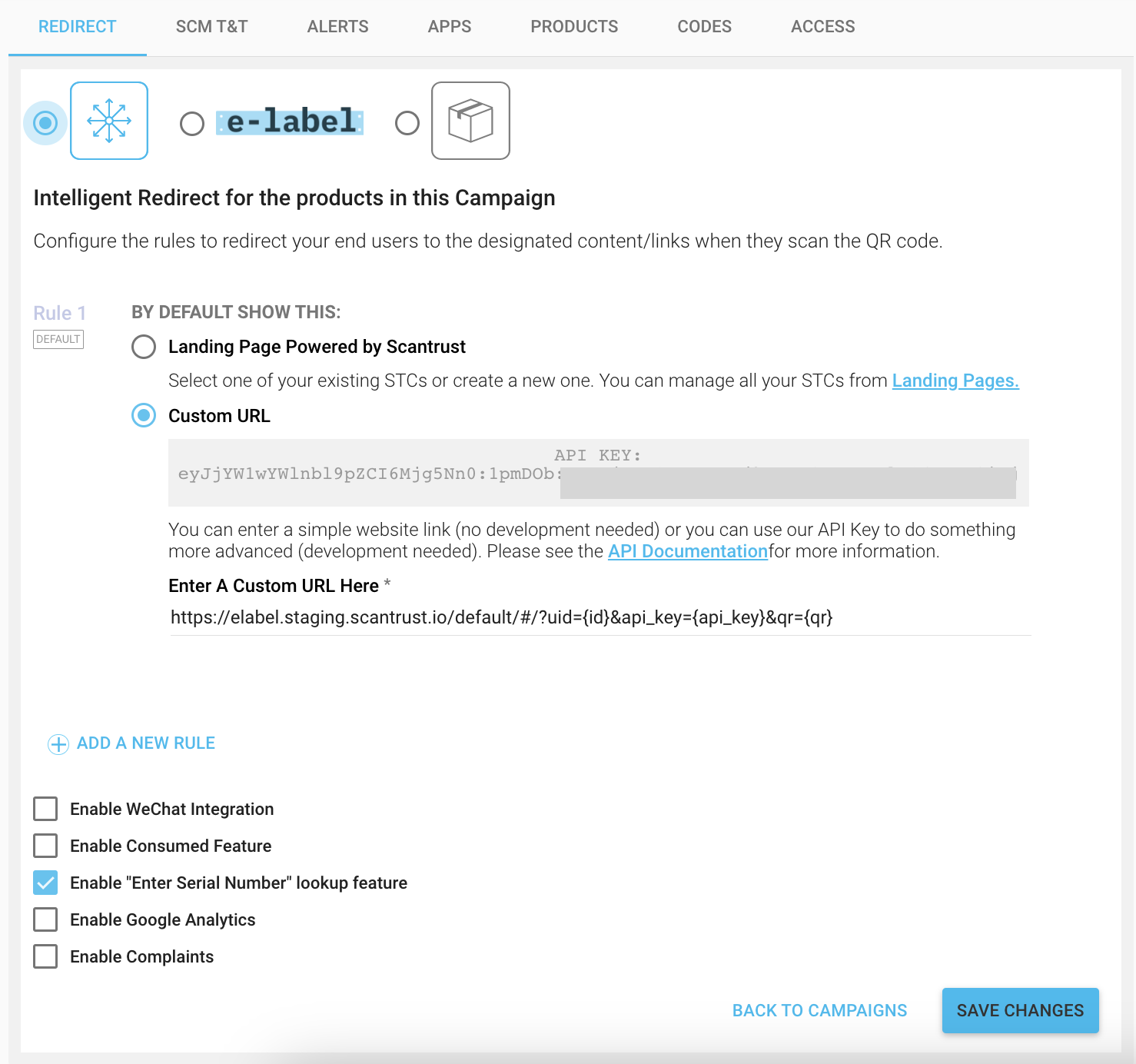
Other parameters that can be added to this redirect URL include
| Parameter | Description |
|---|---|
| {qr} | Qr code ID |
| {id} | Scan ID |
| {sku} | Product SKU - Release ETA 20 OKT 2022 |
| {lat} | Location Latitude |
| {lng} | Location Longitude |
| {utid} | User Tracking ID |
| {region} | Region Key |
| {api_key} | Campaign Api Key |
| {install_id} | App Install ID |
| {app_compat} | App Compatibility |
| {product_url} | Product URL |
| {brand_url} | Brand URL |
| {company_url} | Company URL |
| {scm:param} | SCM Parameter (param interchangable with actual SCM key) |
index.html
<html>
  <head>
    <script src="./scantrust_stc_sdk.js" type="text/javascript"></script>
    <script src="./script.js" type="text/javascript"></script>
  </head>
  <body></body>
</html>
scantrust_stc_sdk.js
function ScanTrustConsumerScan(apiKey) {
  var apiKey = apiKey;
  var scanId = "";

  // User accepted to share his position and a GPS location was retrieved
  // The pos object contains the position coordinates.
  // pos.coords.lat -> Latitude
  // pos.coords.lng -> Longitude
  var success = function (pos) {
    fetch("https://api.scantrust.com/api/v2/consumer/scan/<uuid>/geotag/", {
      method: "POST",
      mode: "cors",
      headers: {
        "Content-Type": "application/json",
        "X-ScanTrust-Consumer-Api-Key": apiKey,
      },
      body: JSON.stringify({
        lat: pos.coords.latitude,
        lng: pos.coords.longitude,
      }),
    })
      .then(function (response) {
        if (response.ok) {
          return response;
        } else {
          throw new Error();
        }
      })
      .then(function () {
        console.log("Scantrust Consumer SDK: Scan Location successfully updated");
      })
      .catch(function (err) {
        console.error("Scantrust Consumer SDK Error: " + err);
      });
  };

  // User didn't accept to share his position or the browser was unable to retrieve a GPS location
  // Reason for failure is inside the positionError object.
  // positionError.code == 1 PERMISSION_DENIED, The acquisition of the geolocation information failed because the page didn't have the permission to do it.
  // positionError.code == 2 POSITION_UNAVAILABLE The acquisition of the geolocation failed because at least one internal source of position returned an internal error.
  // positionError.code == 3 TIMEOUT The time allowed to acquire the geolocation, defined by positionOptions.timeout information was reached before the information was obtained.
  var error = function (positionError) {
    console.log(
      "Scantrust Consumer SDK : Can't retrieve position. Code: " +
        positionError.code +
        " message: " +
        positionError.message
    );
  };

  this.updateScanLocation = function (id) {
    if (!id) {
      console.error("Scantrust Consumer SDK Error: Scan ID Not provided");
      return;
    }

    scanId = id;

    var positionOptions = {
      enableHighAccuracy: false,
      timeout: 5000,
    };

    navigator.geolocation.getCurrentPosition(success, error, positionOptions);
  };
}
script.js
var API_KEY = "replace-with-you-api-key";
// The scan ID will usually be passed as a query parameter in the URL. Example: https://some-website-url.com?scan_id=90ee96a4-f7ef-46fb-a3d9-181f66ae590d
var scanId = "90ee96a4-f7ef-44fb-a3d9-181f62ae590d";

var sdk = new ScanTrustConsumerScan(API_KEY);
sdk.updateScanLocation(scanId);
Displaying the authentication result
When your landing page loads, call the combined-info endpoint with the scan ID (see Scantrust Consumer API). The response tells you whether the code is genuine, so you can show the right result to the shopper.
The standard check follows this order:
- If the code is blacklisted, inactive, or the authentication scan failed, treat it as a suspected counterfeit.
- Else, if the last scan was a fresh authentication that passed, show genuine. If that scan is older than the timeout, show expired instead.
- Else, the code has not been authenticated yet, so show an authenticate button.
The scan.age value is the number of seconds since the scan. We recommend a 300 second (5 minute) timeout, so an old result page cannot pass as genuine long after the scan.
const scan = data.scan;
const activationStatus = data.code.qrcode.activation_status;

if ((activationStatus !== 'active') || (scan.reason === 'auth' && scan.result !== 'ok')) {
  showScanResult('suspected counterfeit');
} else if (scan.reason === 'auth' && scan.result === 'ok') {
  // Show genuine only for a fresh authentication scan, so an old result page
  // cannot pass as genuine more than 5 minutes after the scan.
  showScanResult(scan.age >= 300 ? 'expired' : 'genuine');
} else {
  showScanResult('Show [authenticate] Button'); // no authentication yet
}
For more complex logic, such as telling a blacklisted code apart from an inactive one, please contact Scantrust support.